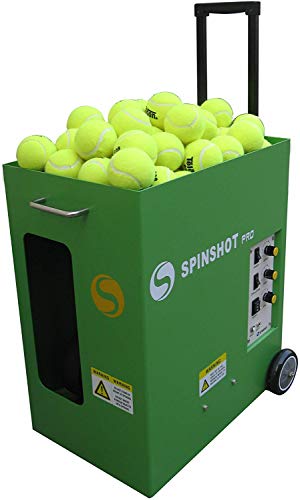
Machine
Spinshot Pro
Direct controls; adjustable topspin, backspin and electronic elevation.
Confirm the selected package, accessories and seller on Amazon.
Check Amazon offer ↗Read the model guideNot feeding can describe several different problems: the machine does not power up, balls do not enter the launcher, the throwing wheels stop, or balls emerge weakly. Start by identifying the observable symptom. This guide organizes the information for a safe, model-specific diagnosis; it does not replace the manufacturer's jam-clearing or electrical-service procedure.
As an Amazon Associate I earn from qualifying purchases. About affiliate links.
Machine
Direct controls; adjustable topspin, backspin and electronic elevation.
Confirm the selected package, accessories and seller on Amazon.
Check Amazon offer ↗Read the model guide
Machine
Lower listed weight; topspin and backspin.
Confirm the selected package, accessories and seller on Amazon.
Check Amazon offer ↗Read the model guideUse the shutdown procedure in your manual before approaching or inspecting a suspected fault. Do not confuse a remote feed pause with complete shutdown. The cited Spinshot Player manual explicitly states that its stop button pauses feeding while the main motors continue running.
Record what was happening when the fault appeared: startup, the first ball, a long set, or a change of drill. Note displayed errors and indicator behavior before any reset that the manual permits. An exact message or photograph is more useful than a later recollection that the machine beeped.
If the machine is powered but no ball emerges, tell support whether the feeder appears inactive, whether a ball is visibly obstructed from an authorized viewing position, and whether the usual motor sound changed. Observe only in ways allowed by the manual; do not open a powered unit to complete a checklist.
If balls emerge but land short or scatter, describe that separately. Record whether every ball behaves similarly or only occasional balls do. Consistently short throws and intermittent erratic throws may call for different checks, so keep those observations distinct instead of reporting only that the machine is broken.
Ask what changed immediately before the issue: a new batch of balls, damp conditions, a different charger, a settings change or extended storage. Confirm the ball type and loaded quantity against the manual. Do not assume the machine can accept an extra-large hopper load just because the balls physically fit.
If the fault began during an unfamiliar program, preserve its settings. Return to a basic mode only if the manufacturer's troubleshooting instructions allow a normal operating check. Changing every setting at once can erase the clues that would help distinguish a configuration issue from a hardware fault.
As an Amazon Associate I earn from qualifying purchases. About affiliate links.
Machine
Direct controls; adjustable topspin, backspin and electronic elevation.
Confirm the selected package, accessories and seller on Amazon.
Check Amazon offer ↗Read the model guideMachine
Lower listed weight; topspin and backspin.
Confirm the selected package, accessories and seller on Amazon.
Check Amazon offer ↗Read the model guideLook up the code or symptom in the manual for your version and follow only the applicable steps. Reset buttons, circuit protection and jam-clearing access differ. Repeatedly resetting a protection device without resolving the cause is not a diagnosis.
Lobster directs owners to its manuals and repair support for troubleshooting. Contact the relevant manufacturer when an obstruction cannot be addressed by its owner procedure, the symptom returns, or the required next step is unclear. Do not substitute an online dismantling video for permission to service your particular machine.
Include model and serial information, battery and charger configuration, the exact symptom, ball type, conditions, error codes and what the approved checks changed. State whether the machine was recently transported or stored and whether any parts have been replaced.
Ask what the next authorized test is and what result would justify a repair. Keep the response with your service record. That turns a vague fault into a reproducible report and reduces the temptation to buy parts on a guess, while preserving the details a technician needs to help.
As an Amazon Associate I earn from qualifying purchases. About affiliate links.
Machine
Direct controls; adjustable topspin, backspin and electronic elevation.
Confirm the selected package, accessories and seller on Amazon.
Check Amazon offer ↗Read the model guideMachine
Lower listed weight; topspin and backspin.
Confirm the selected package, accessories and seller on Amazon.
Check Amazon offer ↗Read the model guideFind a machine · Plan your complete setup · Tennis ball machine homepage