Machine
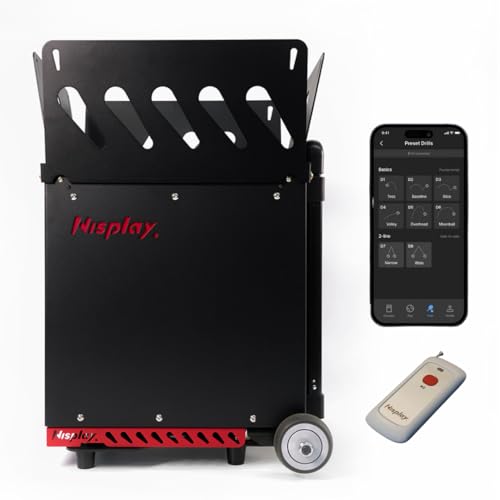
Nisplay N3
Built-in oscillator; adjustable topspin/backspin.
Confirm the selected package, accessories and seller on Amazon.
Check Amazon offer ↗Read the model guideN2 suits a player who wants to set a feed and concentrate on repeated contact. N3 is the more relevant choice when app-selected drills and integrated horizontal movement are priorities. Their similar-looking bodies should not obscure differences in controls, published specifications and what the supplied remote actually does.
As an Amazon Associate I earn from qualifying purchases. About affiliate links.
Machine
Built-in oscillator; adjustable topspin/backspin.
Confirm the selected package, accessories and seller on Amazon.
Check Amazon offer ↗Read the model guide
Machine
External battery for charging; metal enclosure.
Confirm the selected package, accessories and seller on Amazon.
Check Amazon offer ↗Read the model guide| Decision | Nisplay N2 | Nisplay N3 |
|---|---|---|
| Control emphasis | Manual adjustments | App-selected presets |
| Lateral drill evidence | Confirm exact configuration | Two-line and random integrated |
| Listed body weight | 26lb | 29lb |
| Main buying reason | Simple repeated feeds | Organized movement sessions |
N3 explicitly lists app presets, integrated narrow and wide two-line modes, and random horizontal oscillation. N2's primary page describes manual adjustments and a supplied remote. It does not justify assuming N3-style app programming on N2.
If you enjoy making one adjustment at the machine and hitting a basket, direct controls can be sufficient. If you regularly switch between organized movement patterns, integrated modes can save you from manually reconstructing the exercise each time.
Both are advertised with capacity above eighty balls. N2 lists 26 lb and N3 29 lb; both use external lithium batteries, whose inclusion in those weight figures is not explicit. That limits any precise claim about total carry weight.
N2's specification table says 5–65 mph while feature text says 68 mph. N3's table states 6–68 mph. Do not build a recommendation around a tiny top-speed difference that the N2 source does not consistently define.
A repeated feed allows you to watch a specific aspect of your stroke, then make one deliberate change. An alternating pattern adds a planned recovery task. Random placement introduces uncertainty. A productive practice plan may use all three at different times.
The reason to choose N3 is therefore a need for its documented modes, rather than a blanket belief that more movement always means better tennis. If your coach has asked for controlled repetition, use the simplest setting that lets you work on that instruction.
As an Amazon Associate I earn from qualifying purchases. About affiliate links.
Machine
Built-in oscillator; adjustable topspin/backspin.
Confirm the selected package, accessories and seller on Amazon.
Check Amazon offer ↗Read the model guideMachine
External battery for charging; metal enclosure.
Confirm the selected package, accessories and seller on Amazon.
Check Amazon offer ↗Read the model guideN3's included handheld remote is described as start/stop only. Its presence does not mean every parameter can be edited from that remote. Consider whether you want to carry a phone, return to the machine for adjustments or pause frequently between short sets.
Choose N2 if its direct operation fits your sessions and confirm its exact oscillator configuration before purchase. Choose N3 if integrated lateral patterns and app presets solve a recurring need. For either, verify the battery, charger and machine together as a package; compact machine-only specifications do not tell you everything about carrying the full kit.
As an Amazon Associate I earn from qualifying purchases. About affiliate links.
Machine
Built-in oscillator; adjustable topspin/backspin.
Confirm the selected package, accessories and seller on Amazon.
Check Amazon offer ↗Read the model guideMachine
External battery for charging; metal enclosure.
Confirm the selected package, accessories and seller on Amazon.
Check Amazon offer ↗Read the model guideFind a machine · Plan your complete setup · Tennis ball machine homepage